

A MIDI keyboard tells the app exactly which key you pressed, at what moment, and how hard. A microphone has to work all of that out from the sound in the room, and working it out is much harder than it sounds. Both approaches are real and both ship in products people like. The difference is that one of them is a measurement and the other is an estimate, and for feedback that arrives while you are still playing, that difference decides what the software can honestly tell you.
I build SightReader, so I have an obvious stake in this. What follows is the reasoning behind a design decision rather than a case for the decision, and where the trade-off goes against us I have said so.
One update since this was first published. SightReader now has a microphone mode, so an acoustic piano and no cable is no longer a reason to walk away. It does not repeal any of the arithmetic below. A MIDI keyboard is still the input I recommend, and the limits of what listening can honestly tell you are what shaped the mode. What it does, and what it deliberately will not do, is set out towards the end.
What MIDI transmits
MIDI is not audio. It carries no sound at all. When you press middle C on a MIDI keyboard, the instrument puts three bytes on the wire:
0x90 0x3C 0x54The first byte says “note on, channel 1”. The second is the note number: 60, middle C. The third is velocity, how hard you struck it, on a scale of 1 to 127. When you let go, a matching note-off arrives. The browser timestamps each message on arrival, and that is the whole chain. Nothing in it is inferred. There is no model, no threshold, no confidence score. The keyboard is not describing a sound it made. It is reporting a switch closing.
That is why there is no accuracy figure for MIDI note detection. The question does not apply. If the app says you played an F sharp when you meant to play an F, you played an F sharp.
What a microphone has to do instead
A microphone gets one number many thousands of times a second: air pressure. Everything else has to be reconstructed.
The task has a name, polyphonic automatic music transcription, and it is one of the properly hard problems in audio. A single piano note is not a single frequency. Strike an A at 440Hz and you also get energy at roughly 880, 1320, 1760 and upwards, decaying at different rates, shaped by the instrument and the room. That is the harmonic series, and it is what makes a piano sound like a piano.
Now play a chord. The partials of the lower notes land on or near the fundamentals of the higher ones. An A and the E above it share a great deal of spectral content. The algorithm has to decide whether the energy at a given frequency is a note somebody played or an overtone of a note somebody played, and it has to do that for every note in the chord, continuously, while the previous notes are still ringing and the sustain pedal is possibly holding all of them.
It is impressive that this works at all, and it does work.
What the research achieves
The current state of the art for doing this in real time on a phone is Mobile-AMT, presented at EUSIPCO 2024 by Yuta Kusaka and Akira Maezawa at Yamaha. It is good work and the numbers are strong:
- 96.30% note F1 on clean MAESTRO recordings.
- 93.15% note F1 on real-world recordings, which is the number that matters, and it is much better than it has any right to be.
- It runs in real time on mobile hardware, cutting computational cost by roughly 83% against comparable methods.
Two other figures from the same body of work matter more for what I do:
- Note-with-offset F1 falls to 76.80% even on clean studio audio. Offsets are note endings, which is to say durations. So the weakest number in the literature is the one rhythm assessment depends on.
- Trained without heavy augmentation for room acoustics, background noise and device characteristics, real-world F1 collapses to 78.84%. Robustness in the wild is not free. It has to be engineered in, and a product that has not done that work will be much worse than the headline suggests.
A 2024 evaluation paper, Towards Musically Informed Evaluation of Piano Transcription Models, makes a further point worth taking seriously: high F1 scores can mask musical failures. Onset timing degrades measurably as noise levels rise, and there is a statistically significant drop between clean benchmark datasets and the same material re-recorded acoustically. The score can look fine while the musical result is not.
The latency arithmetic
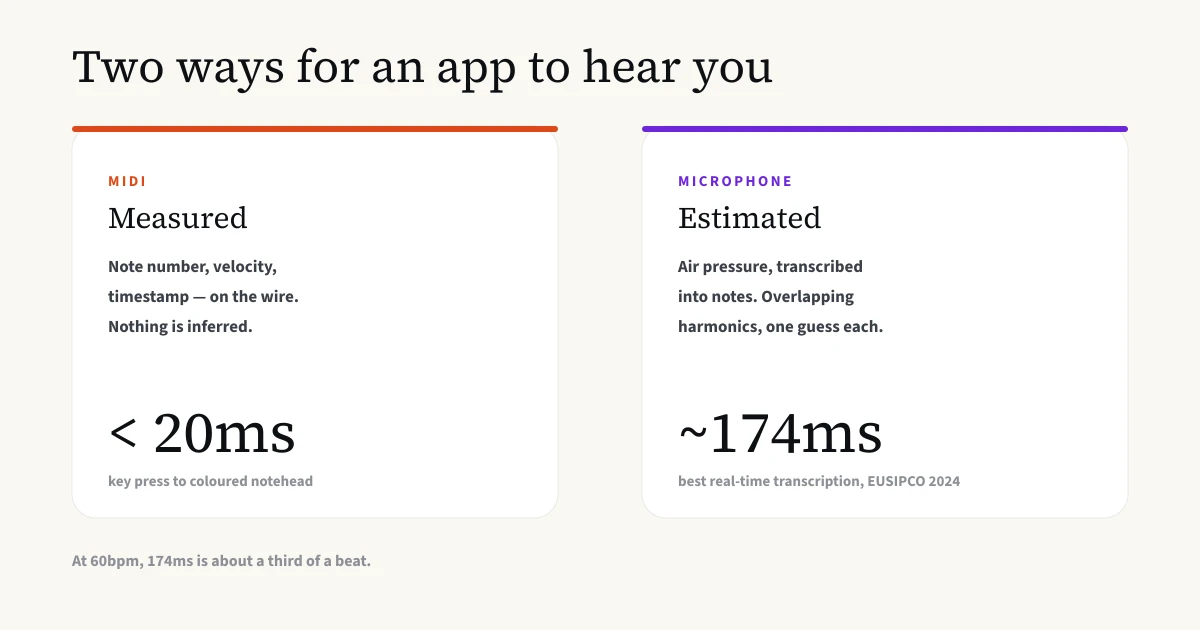
Mobile-AMT reports 174ms of latency. Over MIDI, the round trip from key press to a coloured notehead on screen is under 20ms in a browser. The Web MIDI API delivers the message with a hardware timestamp and the rest is rendering.
174 against 20 is roughly nine times slower, but the ratio matters less than this sum:
At 60 beats per minute, one beat is 1000ms. So 174ms is about a third of a beat. At 120bpm (a brisk Grade 3 piece), it is two thirds of a beat.
Think about what that means for feedback while you play. You strike a note. By the time the app has decided what it was, you are most of the way to the next one. You cannot colour a notehead as it happens, you cannot tell a player they are dragging while they are dragging, and you certainly cannot score onset timing to a tolerance finer than the delay in measuring it. Our rhythm tolerance is 120ms at the tightest. That budget is gone before the transcription finishes.
This is why I keep coming back to latency rather than accuracy as the deciding argument. Accuracy you can improve with a better model. The latency is doing real work (it is the time the algorithm needs to hear enough of the note to be sure what it was), and shrinking it below the length of a piano attack is not a matter of engineering effort.
The error arithmetic
Now the accuracy side, because the way the number behaves over a piece is worse than the number suggests.
Take 95% note accuracy, comfortably inside what the research reports for real-world audio. A Grade 5 piece runs to roughly 500 notes. Five per cent of 500 is about 25 wrong verdicts per attempt.
Twenty-five is not a disaster in itself. The problem is which twenty-five. You do not know. There is no marker on screen that says “this one was the algorithm’s fault”, because if the algorithm knew it was wrong it would not have been wrong. So a player looking at a red notehead has to decide whether they misread the score or the software misheard the room, and there is no way to tell from the inside.
For a product whose entire value is that you can trust the verdict, an untraceable error rate is corrosive in a way a slower verdict is not. It teaches you to discount the feedback, and feedback you discount is worth nothing. MIDI has no equivalent failure because it is not making a judgement.
You do not have to take my word on the practical consequences either. Note-detection failure is the most common complaint in reviews of the two most heavily marketed microphone-based products. Simply Piano’s own help centre is direct about the remedy: connecting a MIDI keyboard “will give perfect note recognition and will solve any issues with note recognition, particularly when playing more advanced music”. The rest of that page is about room noise, phone cases over the microphone, and playing louder. The research explains why those instructions exist.
Why offsets matter most for us
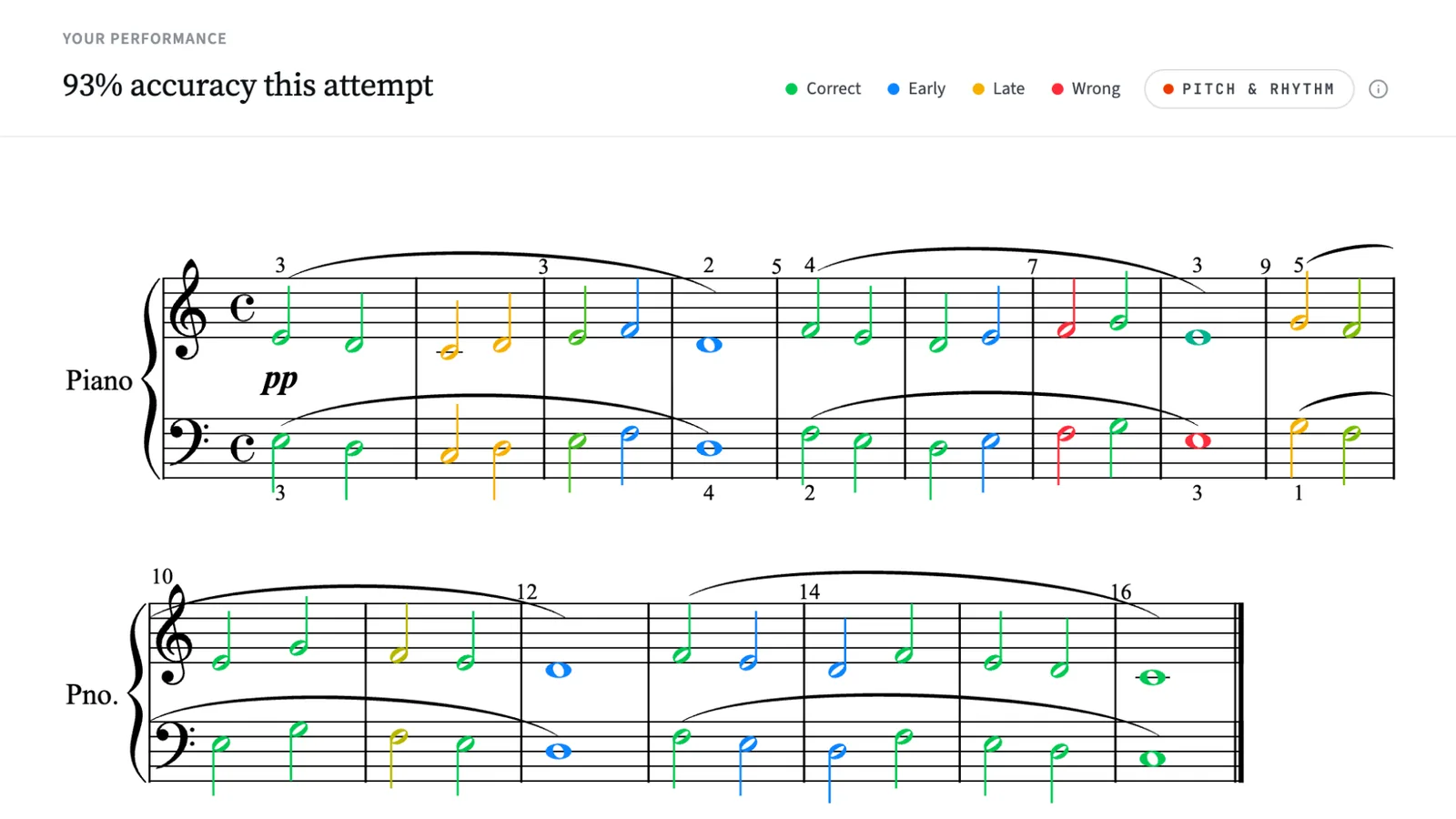
Sight reading has two halves: the right notes and the right time. SightReader’s Pitch & Rhythm mode grades the second half independently. With the metronome running, every onset is measured against the beat, and the results tell you what percentage landed on time, early and late, plus your average tendency in milliseconds.
That whole feature runs on MIDI timestamps, and the offset number above is why. Rhythm assessment is a measurement of when things start and stop. It is the one job where the literature’s weakest figure is the figure you depend on, and where a 174ms delay is not a rounding error but a third of a beat.
If I could not measure timing to a tolerance I trusted, I would not ship a timing score. Shipping one anyway, on inferred data, would produce a number that looks authoritative and is not, which is the worst outcome available.
That is not a hypothetical any more. Pitch & Rhythm mode is the one part of SightReader the microphone cannot reach: turn the metronome on while the mic is listening and the app says so and asks you to connect a keyboard. Pitch practice on the microphone works as normal. I would rather withhold the timing score than print one I do not believe.
Why we don’t import MIDI files either
This is the part that surprises people, because it looks like a limitation with no argument behind it. The score you read from has to be a MusicXML file, and no other format. That rules out MIDI files, PDFs and recordings.
It is the same reasoning as the microphone one, pointed the other way.
MIDI carries performance data. It is superb at that. What it does not carry is notation. A MIDI file has no clef assignment, so the software has to guess which hand plays what. It has no key-signature semantics, so it cannot tell you whether that black key is an A flat or a G sharp: the two are the same MIDI note number 68 and completely different things on a page. It has no voicing, so overlapping lines in one hand collapse into a soup of simultaneous notes. It has no beaming, no articulation, no rests as written, no spelling of any kind.
Rendering a readable score from raw MIDI means inferring every one of those. That is the same class of problem as transcribing audio, just milder, and it produces the same kind of output, which is a plausible guess. If you have ever imported a MIDI file into notation software and watched it produce a bar of quintuple-dotted rests, you have seen it.
MusicXML already contains the notation. Clefs, key, spelling, voices, beams, slurs, fingering, the lot. What you see on screen is what the composer or editor actually wrote, and when the app marks a note wrong it is marking it against the score rather than against a reconstruction of the score.
If your music is in MuseScore, Sibelius, Finale or Dorico, exporting MusicXML takes about twenty seconds. I have written a short guide to doing it in each.
The principle, stated once
We only claim precision where we have it.
MusicXML in for scores rather than inferred notation, because notation inferred from a MIDI file is a guess and marking you against a guess is indefensible. MIDI in from the keyboard wherever a figure has to be exact, which is every millisecond we print. And where we do listen, the mode is built so the app never asserts more than it heard: it withholds the rhythm score, it grades a chord on the sound of the chord rather than pretending to identify each voice, and when the evidence is ambiguous it says nothing rather than marking you wrong.
Everything above is evidence for that sentence. The sections below are what it adds up to in practice.
When another app is the better choice
When this was first published, an acoustic piano and no MIDI keyboard meant SightReader could not help you at all. That is the gap microphone mode closed, and closing it was the right call: an estimate you can use beats a measurement you cannot.
It was never a small group. It is uprights in family homes, school practice rooms, and every pianist who has a perfectly good instrument and no interest in buying a second one with a USB socket.
Other tools may still suit you better, and it is worth naming why. Sight Reading Factory is well made, well regarded, used by a lot of teachers, and covers more than 60 instruments including voice. We do piano. Simply Piano, Skoove and flowkey all accept microphone input alongside MIDI, and all three are polished products with catalogues we cannot match. And if what you want is a timing score without a keyboard, we do not offer one, for the reason set out above.
What our own microphone mode does
Choose the microphone when you set up and SightReader listens to the room and marks what you play: any piece, any exercise, any scale or note drill, on an upright, a grand, or a digital piano you cannot connect. It needs no cable and no adapter. The audio is analysed on your device as it arrives and then discarded. Nothing is recorded, nothing is uploaded, and there is no audio for us to hold.
It also reaches further than MIDI does. Web MIDI works in Chrome, Edge, Opera and desktop Firefox, and in no browser at all on an iPhone or iPad. Any browser that can record audio can run microphone mode, Safari and Firefox included, and both apps support it from a recent build.
The reason it can work at all, when the research above says real-time transcription costs 174ms and a few wrong notes in every hundred, is that we are not doing transcription. Open transcription has to answer “what was played”, out of the eighty-eight possibilities, from sound alone. We already have the score, so the question is the far narrower one of whether what just sounded is consistent with the notes we are expecting. Knowing the answer set is worth a great deal, and it is what the mode is built around.
The honest limits, stated once:
- Single notes are marked as they are over MIDI. Green for right, red for wrong, cursor advancing as you go.
- Chords are graded on their overall sound, not note by note. The mode checks the chord you played against the chord that was expected. When the evidence contradicts it, the position marks wrong. What it will not do is point at the one inner voice you fluffed, because separating that voice out of a mixture is the inference this article is about.
- Pitch & Rhythm mode is unavailable on the microphone. See the offsets section above. Connect a keyboard by USB or Bluetooth and it switches on.
- Feedback arrives a little behind the key. Detection needs a moment of sound to be sure. Grading timestamps are pushed back to the attack, so it does not distort your marks, but the colour does land slightly after the note.
- Ambiguity is resolved in your favour. When the sound is not clear enough to call, the mode marks nothing rather than flashing red at something you may well have played correctly. It will under-count a mistake before it invents one.
- The room matters. A quiet space, the device near the piano, and headphones if you are running the metronome, or the click comes back in through the microphone. The practice piano sound is muted by default in this mode for the same reason.
I am not publishing an accuracy figure for it. The numbers I have come from our own test fixtures rather than from strangers’ living rooms, and quoting those next to peer-reviewed research would flatter us by comparing unlike with unlike. What the app tells you instead is on the screen: sessions marked by listening carry a note saying so, and a keyboard marks every note exactly.
What we offer with no keyboard and no microphone
There is an on-screen piano you can play with your computer keyboard. It covers two octaves, C3 to B4, which is enough for Initial Grade and early Grade 1 pieces and enough to see whether you like the app. It is not enough for real repertoire and it is nothing like playing the piano.
There is also honour mode: play the piece on whatever instrument you have, then tell the app how it went. That keeps your practice history intact. It is self-reported, so it is exactly as accurate as you are.
MIDI and microphone, side by side
| App | What reaches the app | Latency | Note error rate | Works with an acoustic piano | Degrades in a noisy room |
|---|---|---|---|---|---|
| Microphone | Audio, transcribed | ~174ms | ~4–7% on real-world audio | ✓ | ✓ |
| MIDI | Note number, velocity, timestamp | Under 20ms | None (not inference) | ✗ | ✗ |
Those microphone figures are for open transcription, which is the problem an app faces when it has no idea what you are about to play. SightReader’s own microphone mode has the score in front of it, which is a different and much easier question, and is why the mode exists at all. It is still listening, so the limits in the section above still apply.
FAQs
Do I need a MIDI keyboard for a sight-reading app?
For the most precise feedback, yes. MIDI is a data protocol: the keyboard reports which key went down, when, and how hard, with no guessing involved. Apps that listen through a microphone have to infer all of that from sound, which is slower and imperfect. Plenty of good apps do it anyway, SightReader among them, and if you have an acoustic piano it is the option that works.
Can an app hear my acoustic piano?
Yes. SightReader has a microphone mode, and so do Sight Reading Factory, Simply Piano, Skoove and flowkey. What listening cannot do is match the timing precision or the certainty of MIDI: the best published real-time piano transcription runs at about 174ms of latency and mis-labels a few notes in every hundred, and neither number is visible to you while you play. In SightReader that is why single notes are marked as they are over MIDI, chords are graded on their overall sound rather than note by note, and Pitch & Rhythm mode asks for a keyboard connection.
Why can’t apps detect chords from audio?
They can. Polyphonic piano transcription works, and works well: recent research reports note F1 scores in the mid-90s on real-world recordings. The problem is that it is approximate and slow in a way that matters for live feedback. A single piano note produces a whole harmonic series, and the partials of one note land on the fundamentals of others, so separating a chord takes inference. Inference takes time and produces occasional wrong answers.
What’s the difference between MIDI and MusicXML?
MIDI describes a performance: which note, when it started, when it stopped, how hard. MusicXML describes notation: clefs, key signatures, enharmonic spelling, voices, beams, articulation. You can generate a rough MIDI file from a score, but going the other way means guessing at everything the MIDI file does not carry. That is why SightReader reads MusicXML for scores, and nothing else.
Does SightReader work without a MIDI keyboard?
Yes. Microphone mode listens to whatever piano you have, an upright, a grand, or a digital piano you cannot connect, and marks what you play. Single notes are marked as they are over MIDI, chords are graded on their overall sound rather than note by note, and Pitch & Rhythm mode needs a keyboard connection. There is also an on-screen piano covering two octaves (C3 to B4), and honour mode, where you play on any instrument and report your own result. A MIDI keyboard is still the most precise way to work.
Sources
- Kusaka, Y. and Maezawa, A., Mobile-AMT: Real-Time Polyphonic Piano Transcription for In-the-Wild Recordings, EUSIPCO 2024: PDF
- Towards Musically Informed Evaluation of Piano Transcription Models, 2024: arXiv:2406.08454
- Kong, Q. et al., High-resolution Piano Transcription with Pedals by Regressing Onset and Offset Times, 2020: arXiv:2010.01815
- Simply Piano Help Center, Ways to Improve Note Recognition in Simply Piano: help.hellosimply.com
Figures checked 1 August 2026. Updated 17 September 2026 to cover SightReader’s microphone mode.