

A sight-reading app that scores your timing.
SightReader does this. Turn on the metronome and every note you play is scored against the beat: on time, early or late, down to your average tendency in milliseconds. It works on every piece in the library, in the browser and in the iOS and Android apps, and it’s in the free tier.
As far as we can tell, no other sight-reading app reports timing as its own score. If you find one that does, we’d like to hear about it.
How beat-relative timing is measured
When you start, you get a count-in of whole bars, at least four clicks. That count-in sets the grid. From then on, the app knows the moment each note in the score should sound.
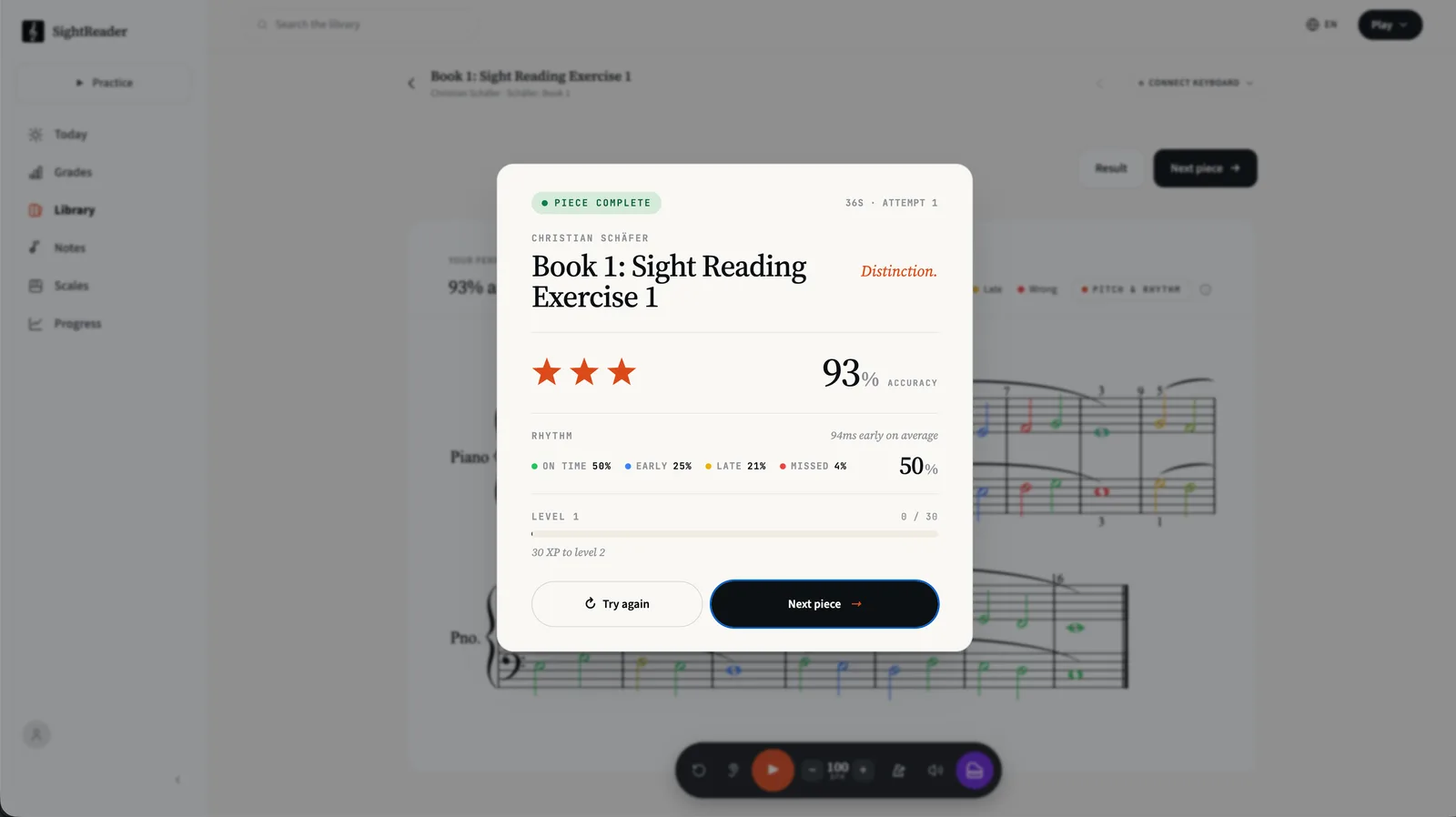
Each note you play is compared against that moment. Land close enough and it’s on time: the notehead stays green. Play ahead of the beat and it shades blue, the earlier the bluer. Play behind it and it shades yellow. If the beat moves on before you play at all, the note goes red and the music carries on without it. You rejoin wherever the beat is now, the way you would with a teacher counting.
The windows are deliberately forgiving, because you’re syncing to a click you hear, not a clock you can see. We’re still tuning how strict the whole thing feels. There’s also a bar of grace at the start, so one fumbled entry doesn’t colour the attempt.
An app that tells you if you’re rushing
The results card reports your average tendency in milliseconds: “94ms early on average”, for example. That single figure is the most useful thing in the breakdown. Consistently early means you’re pushing ahead of the click, usually nerves or habit. Consistently late means you’re reading each note and then deciding to play it, which is its own habit to unwind.
Either way, you leave the session knowing which direction you drift and by how much. A metronome alone can never tell you that, because it can’t hear you.
A piano app that scores rhythm separately from pitch
Rhythm here isn’t folded into a single accuracy number. Pitch and timing are scored as separate dimensions: you can hit every note and still find out your reading collapses at tempo, or keep perfect time while misreading a key signature. Both facts are useful, and a single blended number would hide them.
With the metronome off, SightReader behaves more like a patient teacher: the score waits at every note while you find it. That’s Pitch Only mode, and it’s the right place to start. The metronome switches between the two whenever you like.
Try it on a real piece
Open any piece, tap the metronome, and play through the count-in. The first attempt is usually humbling, but that wears off faster than you’d think.
Start practising free